


This walkthrough shows you how to integrate WebSpellChecker in WebTextEditor.
During this walkthrough, you will learn how to do the following:
- Integrating WebSpellChecker in WebTextEditor.
 Prerequisites
In order to complete this walkthrough, you will need the following:
- Visual Studio 2008 Application.
Step-By-Step Instructions
To create custom task pane in WebTextEditor
- Launch Visual Studio.NET 2008.
- Click on File menu, then select New and click Web Site.
- Select ASP.NET Web Site in the Template box and set Location to HTTP.
- Named the Web Site and click OK.
- Right-click on Project's name and select Add New Item.
- Select WebForm in the My Templates box and named it as Walkthrough.aspx.
- Drag WebTextEditor instance from ToolBar to WebForm.
- Drag WebSpellChecker instance from ToolBar to WebForm.
- Copy the Dictionary folder under WebTextEditor >> Dictionary from WebTextEditor sample to the project root folder.
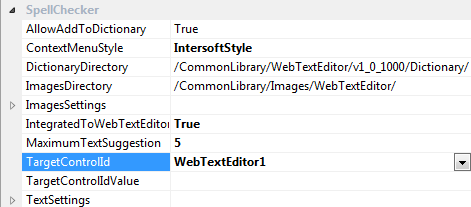
- Set the TargetControlID to WebTextEditor id control and IntegratedToWebTextEditor to true.
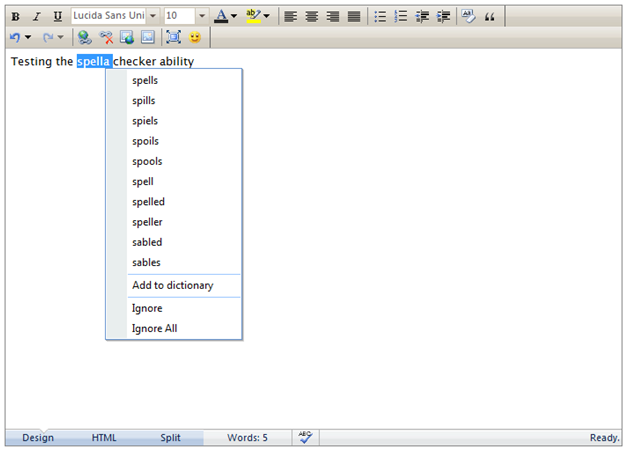
- Run the sample in Web Browser.
 See Also
Other Resources
{Sophisticated Navigation Experience}